How To Play Sudoku
In each Sudoku puzzle you have a 9×9 grid, divided into nine 3×3 blocks.
So each row, column or block contains nine cells You. start a Sudoku puzzle with some cells already filled in with numbers.
You can't change these numbers. The more cells are pre-filled the easier the puzzle.
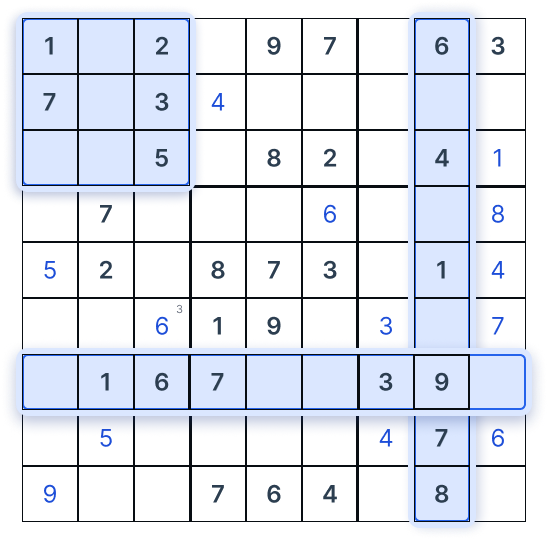
Fill the Remaining Cells
Now you just need to fill the remaining cells with numbers from 1 to 9, obeying the only rule:
Each row, column or block must not contain repetitive numbers.
The Goal
So each number from 1 to 9 occurs only one time in each row, column and block.
You Can Do It!
Sounds like a tricky task? Just start scanning the board and you'll find all clues you need, one by one, and get the puzzle solved.
Grid Scan
The more advanced technique you can use for a harder puzzle called 'scanning': it exploits the fact that any given number from 1 to 9 can occur only nine times in a completed Sudoku puzzle.
Scan the grid for the number 5
Now draw a horizontal and vertical line from every 5 on the grid (you remember you can't place another 5 in a row or column) — it will quickly become clear there are almost no cells left where you can actually put it.
Draw a horizontal and vertical line from every 5 on the grid.
You remember you can't place another 5 in a row or column — it will quickly become clear there are almost no cells left where you can actually put it.
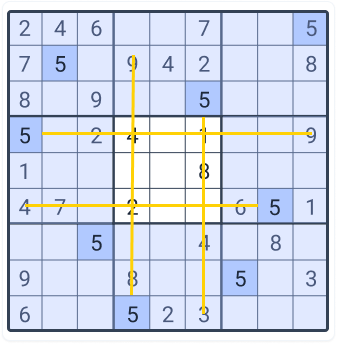
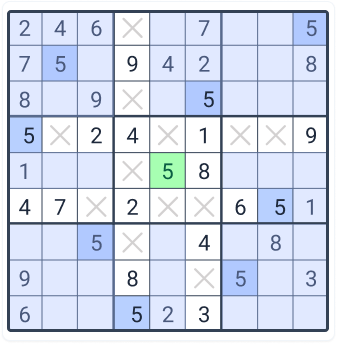
every 5
(row & column)
place 5
cell for 5
Smart Tools. Smarter Solving.
Use handy tools like Notes, Undo, Erase and Settings to solve Sudoku with confidence.
fix mistakes easily
PENCIL (NOTES)
Click the note icon to enable pencil mode. Add small notes in the cells to mark possible candidates.
FINAL MODE
Click the note icon again to switch to normal mode and place big final numbers.
UNDO & ERASE
Made a mistake? Use Undo to revert your last move or Erase to clear any cell easily.
SETTINGS
Open Settings (gear icon) to explore error highlighting modes and find candidates faster.
POWER UP WITH SETTINGS
Try different error highlighting modes to
quickly spot mistakes and find the right
candidates.
Show Errors
Highlight conflicting numbers
Show Duplicates
Highlight duplicates
in rows, columns
and boxes
Highlight Candidates
See possible candidates clearly in each cell
Auto Check
Auto check entries as you play